
AI POWERED

Maintenance Agent for WordPress

Comprehensive WordPress maintenance on autopilot.
For your entire portfolio, Agent-driven, scheduled, safety & hardening built in.

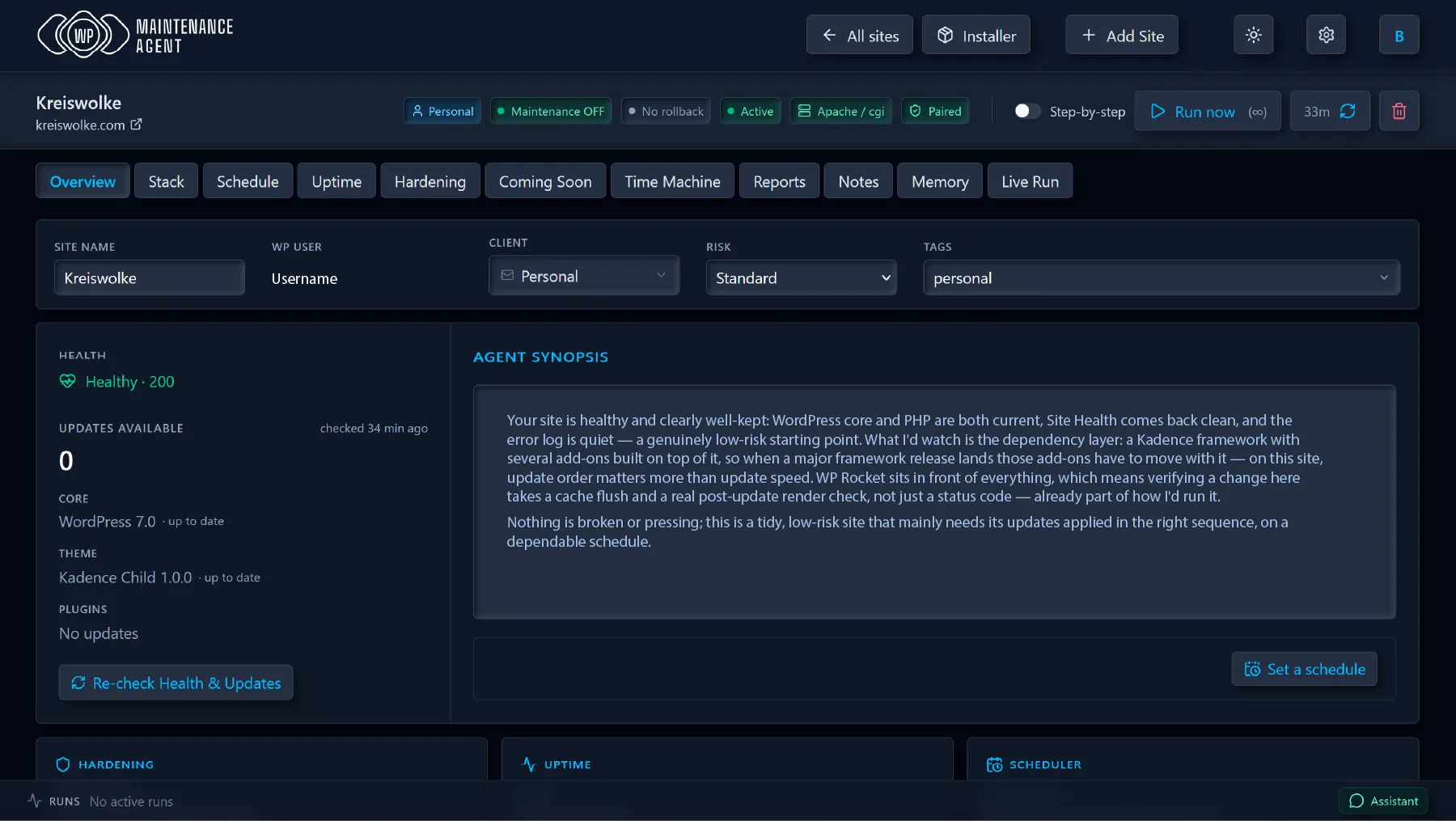
WP Maintenance Agent Overview Dashboard
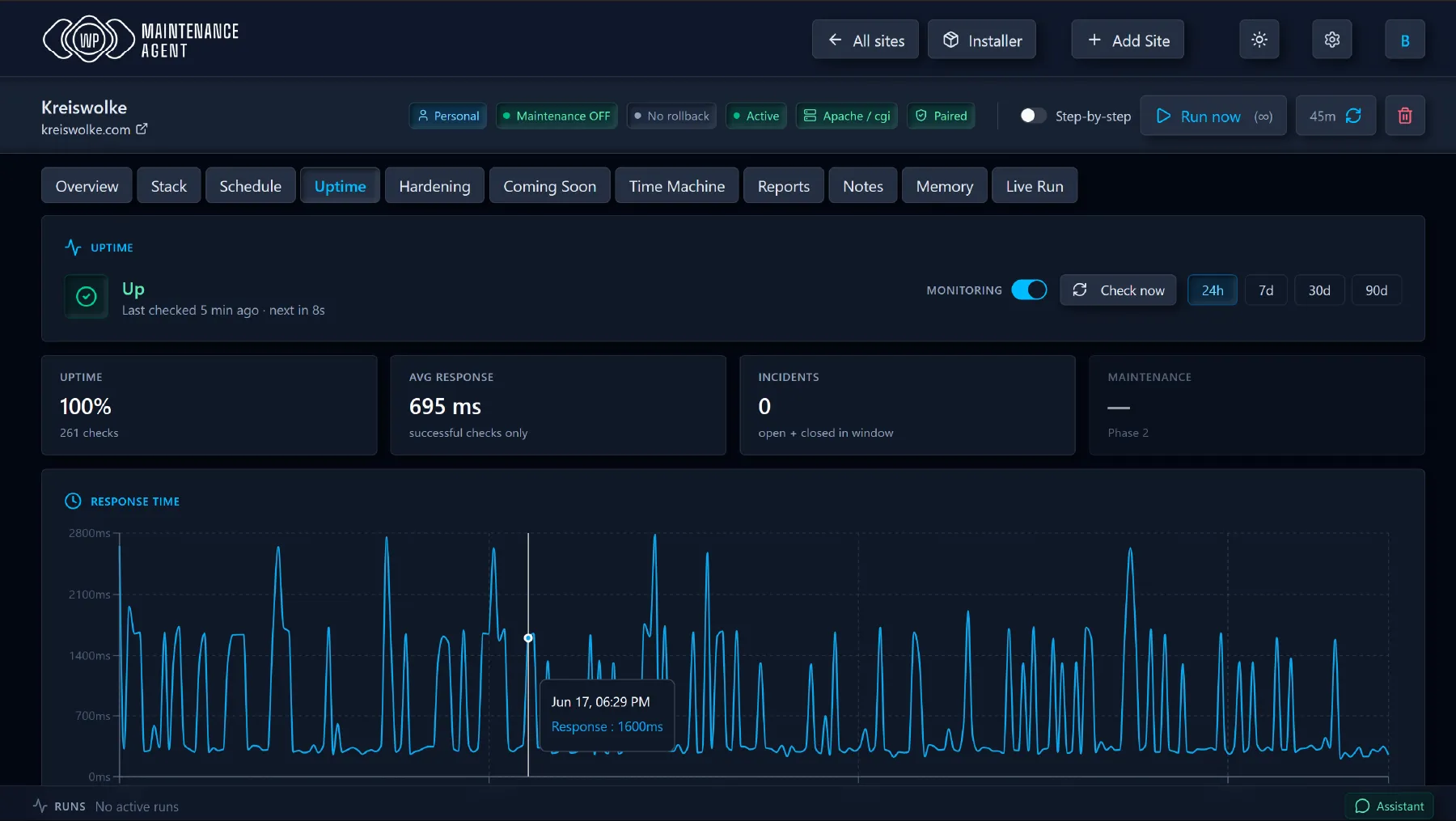
WP Maintenance Agent Uptime Monitor

Maintenance Agent

AI that reads your site stack, plans update order by dependency, and executes one item at a time with health checks. Rolls back on failure. Learns from every run.

Stack Management

Install, update, activate, deactivate, or remove plugins and themes — on one site or across all of them. By default, safety-wrapped with automatic rollback.

Monitoring

Uptime checks with incident detection. SSL and domain expiry tracking. Daily health probes. Problems surfaced before they become emergencies.

Security & Hardening

Login gate, Apache rules, security headers, wp-config lockdowns, anti-bot features, WP hardening. Remote control included.

Reports & Notifications

Configurable alerts, scheduled digests, and detailed reports, with independent routing for agency and clients.

Portfolio & Site Management

Dashboard, client management, tags, filters, white-label agency branding. Works for one site. Scales to hundreds.

Maintenance Is Not Optional in the Age of AI

AI-powered tools scan for vulnerabilities at machine speed. The gap between disclosure and exploit is shrinking to hours. Hardening and daily updates across every site aren’t best practice — they’re the minimum.

How It Works

/

Connect

Install the free plugin, click Connect — your site connects through a secure key, automatically. Then the agent runs its first assessment of your site.

Read

Full inventory. Every plugin, theme, MU-plugin, drop-in. WP, PHP, DB versions. Recent fatals, disk space, update transients. Ground truth, not cached guesses.

Plan

The agent reads your stack, your notes, and everything it remembers from previous runs. Builds a dependency-aware update order. Base plugins before add-ons. Flags risks. Skips what the PHP version can’t support.

Secure

Full site snapshot to a rollback directory before anything gets touched. WPMA owns its own recovery path — no backup plugin dependency. If one’s detected, it triggers that too.

Execute

One update at a time. Cache flush and health check after each. If something breaks, the agent decides per case: retry, wait, skip, roll back, or escalate. No batch-and-pray.

Adapt

After a rollback, the agent re-plans. Remaining updates re-evaluated, order adjusted. The run continues or halts — the agent reads the situation and calls it.

Review

Final health probe. Outcome judged. New observations written to site memory. Snapshot archived for one-click restore. Structured report sent to whoever needs it.

When we say comprehensive, we mean it!

100+ features in the agent’s toolkit — run them on autopilot, or pick up any by hand.

Maintenance Agent

  • Reads site stack, agency notes, and per-site memory before every run
  • Dependency-aware update planning — base plugins before add-ons
  • One-by-one updates with cache flush and health check after each
  • Smart failure handling — retry, wait, skip, roll back, or escalate per case
  • Re-plans mid-run after any rollback
  • On-disk version verification after every update and rollback
  • Distinguishes frontend-gated sites from actually broken ones
  • Premium plugin awareness — flags license-expired vs broken
  • WP core as a first-class update target with extended timeout
  • PHP compatibility pre-flight to prevent incompatible updates
  • Risk tiers — standard, caution, high — with confirmation gates
  • Step-by-step mode for hand-holding on sensitive sites
  • Self-updates at the start of every run
  • Real-time event stream
  • Remote control for Maintenance Mode & Coming Soon

Security & Hardening Plugin

  • Apache and PHP-level hardening
  • Login gate with remote PIN management
  • Block PHP in uploads, xmlrpc, author enumeration, sensitive files
  • Honeypots and bad user-agent filtering
  • Hide usernames from REST, oEmbed, and author archives
  • Generic login errors, security headers, DISALLOW_FILE_EDIT
  • Managed MU drop-in — no wp-config editing
  • Master kill-switch disables all rules instantly, restores on release
  • Full REST API and WordPress Abilities API
  • MU-plugin companion for heartbeat & emergency restore
  • Maintenance Mode & Coming Soon built in

Cross-Site Installer

  • Install, activate, deactivate, delete, or update across your entire fleet
  • Browse wp.org catalog & your fleet inventory side-by-side
  • Per-site action preview — color-coded plan before you click Apply
  • Safe-install mode wraps each site in maintenance-mode + snapshot + auto-rollback
  • Auto-refreshes version data before computing the plan
  • PHP compatibility warnings across your fleet
  • Premium plugin detection via curation + heuristics
  • Custom plugin metadata editor
  • Completion email for large batches
  • wp.org metadata for top 2000 plugins and themes, refreshed daily
  • Aggregated intelligence across all managed plugins
  • Premium plugin registry with site-stack heuristic overlay

Rollback & Recovery

  • Per-item folder rollback — no backup plugin dependency
  • Optional remote trigger of compatible backup plugins
  • Full database snapshot before every run
  • DB checkpoints mid-run for high-risk steps
  • Every restore verified against the filesystem
  • History with one-click restore from past runs
  • Emergency restore via MU companion — works even when the main plugin is down

Monitoring

  • Uptime monitoring with incident detection
  • Heartbeat: DB status, fatals, cron health, disk, cache layer
  • Interactive uptime chart with shaded incident regions
  • Auto cert check via TLS handshake, including CDN
  • RDAP-based domain expiry lookup with graceful fallback
  • Manual entry for ccTLDs that hide expiry data

Site Intelligence

  • Full plugin/theme/MU-plugin/drop-in inventory with update availability
  • WP, PHP, DB versions and Site Health metrics
  • Per-plugin compatibility headers — required PHP/WP, dependencies, last release date
  • Per-site memory — accumulates observations and patterns across runs
  • Per-site notes — agency-authored, injected into agent context
  • Ground-truth update transients — no stale cache

Scheduling

  • Multi-day weekly schedules with per-site overrides
  • Timezone-aware — your wall clock, DST handled
  • Minute-precision worker with overlap protection
  • Daily health checks per site at configurable hour

Dashboard & AI

  • In-app chat assistant — type a request, the agent acts
  • Connect your own AI assistant over MCP
  • All sites: status, health, pending updates, last run, next scheduled, uptime
  • Filter by client, tags, health status — multi-tag AND filtering
  • Bulk check, bulk run with runtime estimate
  • Per-site detail: Overview, Hardening, Stack, Schedule, Uptime, Time Machine, Reports, Notes, Memory, Live Run, Coming Soon

Reports, Notifications & Agency Tools

  • Per-site cadence with agency and client routing
  • Restore or resend from unified history and archives
  • Per-site detail: Overview, Hardening, Stack, Schedule, Uptime, Time Machine, Reports, Notes, Memory, Live Run
  • Agency HTML, client HTML, Markdown, and raw JSON formats
  • Agency branding on client-facing output
  • Client address book with per-site binding

Compliance & Data Sovereignty

  • EU-hosted infrastructure, Germany
  • GDPR-ready with Data Processing Agreement (AVV)
  • Per-user data isolation with audit-ready logging
  • AES-256-GCM encryption for credentials at rest
  • AI endpoint: EU-resident inference on request

The plugin is free and independently useful: hardening suite, full REST API, WordPress Abilities API, Application-Password auth, Maintenance Mode, Coming Soon and more to come.
Drive it with your own tooling or connect it to the app.

See All features and functionality

You have Questions?
We have answers!

No. WPMA uses WordPress Application Passwords — a built-in WordPress feature that creates a separate credential for API access.

The agent takes a full snapshot before every run and rollback copies of every item it touches. If a health check fails after any update, it rolls back that item in seconds and re-plans the rest of the run. If the plugin itself is broken, an emergency MU companion can restore the site without it.

WP Maintenance Agent works with any host with REST API + Application Passwords + filesystem write access (check these with your hosting provider). If a host locks those down, no tool can work around it — ours included. Try it free and choose: maintenance that reasons, or your host’s blind auto-updates.

Yes — two ways. The free plugin exposes every capability through the WordPress Abilities API, so your own AI can drive a single site directly. On a paid plan, the app adds a one-click MCP connection — point Claude (desktop, web, or phone) at your whole fleet and run maintenance by chat.

Depends. Our agent is purpose-built for maintenance and keeps per-site memory — it gets sharper every run, where a general assistant starts cold each time. And the app runs it for you: dashboard, scheduler, and monitoring make maintenance set-and-forget — nothing to remember, no assistant to prompt, no computer to keep on. Your own AI is great for hands-on work; the app is maintenance that just happens.

WPMA detects premium plugins and flags them in the agent’s context. Most premium plugins with active licenses update normally. If a license is expired, the agent recognizes “version unchanged” as a licensing issue, not a failure.

Yes. The plugin is free and independently useful. Every capability is exposed via REST API and the WordPress Abilities API. If you have your own AI tooling or automation, you can drive WPMA directly.

Germany. EU-hosted infrastructure, GDPR-compliant, with a Data Processing Agreement (AVV) available. Credentials encrypted at rest with AES-256-GCM.

Yes. Cancel whenever — your plan runs to the end of the billing period, your sites and data stay accessible until then, and no exit fees.

Ready to automate your WordPress Maintenance ?